.png)
Choosing a school management platform looks like a technical decision. In reality, it’s an operational one. The right system can make daily work feel simpler and more connected. The wrong one can add friction at every step.
If you’re comparing MySchool and Blackbaud, you’re likely trying to find a better fit for how your school operates. The one that will help simplify workflows, reduce manual steps, and bring information into one place.
Both platforms can support schools effectively, but they’re built differently. Those differences show up in everyday use, from implementation and pricing to reporting and usability.
Before looking at the features side by side, start with a simpler question: what does your school need the system to do well?
How to Choose the Best School Management Platform?
Before getting into a side-by-side comparison, let’s take one step back. The best choice is not always the platform with the longest feature list, but the one that fits the way your school actually works.
School management systems can vary widely in price, functionality, usability, and setup. Since this decision will shape daily operations for years, it is worth getting clear on your non-negotiables first. That gives you a much better lens for judging which platform is truly the better fit.
1. What features do you actually need?
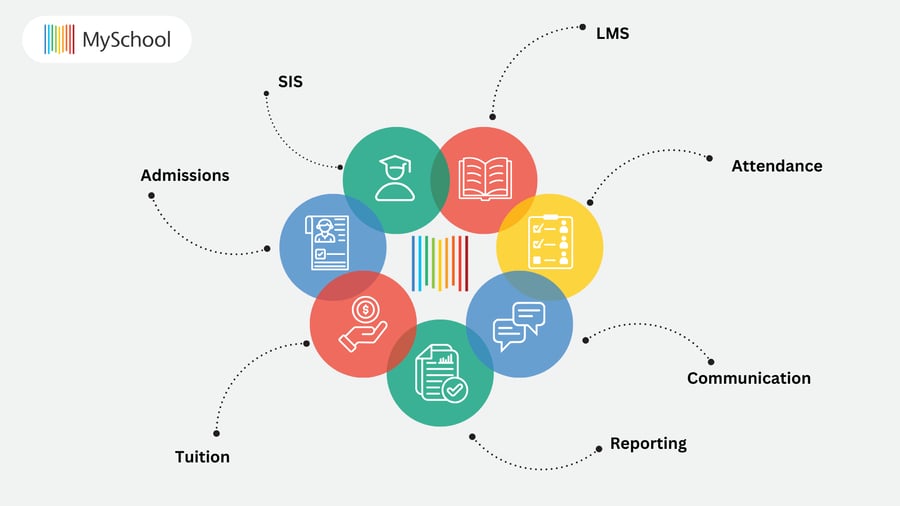
Most K-12 school management platforms aim to support:
- Student information management (SIS)
- Learning management (LMS)
- Admissions and enrollment tracking
- Tuition, billing, and payments
- Attendance and grading
- Parent and staff communication
- Reporting for leadership and compliance
These functions can be handled through separate tools, but many schools prefer a more unified setup. The important question is not just which features are included, but how well they work together and whether they can support your school as it grows.
Start by identifying which of these areas are essential to your operations. That will give you a clearer sense of what your platform actually needs to do well.
And once you know what your school needs the system to handle, the next question is how safely that system handles the data behind it.
2. How to ensure data privacy and security when using a school management system?
Most platforms meet baseline standards such as GDPR and PIPEDA. The more meaningful difference is how data is handled in practice.
For Canadian schools, data residency is often part of that conversation. Some providers host data in the U.S. while remaining compliant, but that can still raise important questions around data sovereignty, access, and long-term peace of mind.
A few questions are worth asking early:
- Where is student data hosted?
- Who can access it, and under what conditions?
- How is data secured, both in transit and at rest?
- What happens to your data if you leave the platform?
It is also worth looking closely at role-based access controls. Without clear permissions, even a compliant system can create risk in day-to-day operations.
When comparing MySchool and Blackbaud, this becomes one of the clearest distinctions: whether you want locally hosted data aligned with Canadian expectations, or a broader global platform built to serve multiple regulatory environments.
And after privacy and security, the next practical question is just as important: how hard will it be to put the system in place?
3. How long does implementation take?
Implementation timelines can vary significantly depending on the complexity of the system, the number of modules you adopt, and the amount of data that needs to be migrated. In some cases, schools spend months onboarding, configuring workflows, and training staff before they begin to see real value.
That is why implementation is not just a technical step. It is part of the buying decision.
Ask yourself:
- How quickly do we need to switch systems?
- Do we have the internal capacity to support a longer implementation?
- Will the vendor guide us through setup, or will more of that work sit with our team?
Some platforms offer faster, more guided onboarding with dedicated support along the way. Others require a more hands-on, phased rollout.
The right balance depends on what matters most to your school. For some teams, speed and simplicity will matter. For others, a longer setup may feel worth it in exchange for deeper configuration.
With those priorities in mind, we can now look at how MySchool and Blackbaud compare across the areas that tend to matter most.
MySchool vs. Blackbaud: Which Platform Suits You Best?
With those priorities in mind, the next step is to look at which platform is more likely to fit the way your school actually operates.
Choosing between MySchool and Blackbaud does not come down to which platform has more to offer in general. It comes down to what kind of experience your school needs, how much complexity your team can realistically support, and which trade-offs make sense for your day-to-day reality.
Both platforms are capable. But they are built with different strengths, and that usually becomes clearest when you look at who each one tends to serve best.
Who does MySchool fit best?
MySchool is a strong fit for schools that value simplicity, speed, and alignment with Canadian requirements.
It’s best suited for:
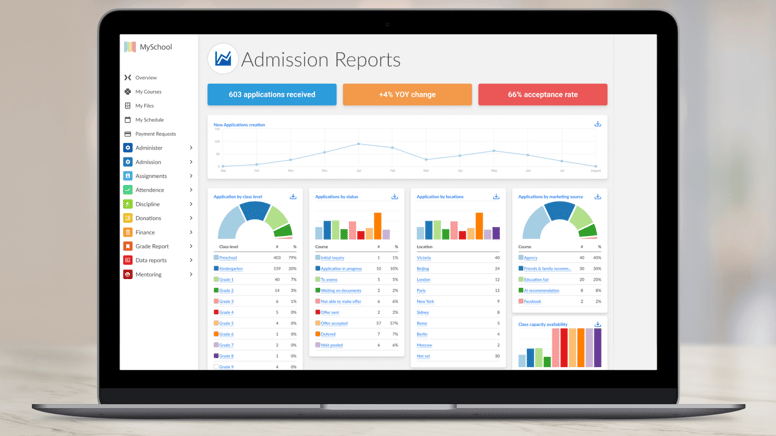
- Canadian K-12 independent schools
- Schools that need built-in provincial reporting (OnSIS, TRAX, 1701, PSR)
- Teams looking for faster implementation and guided onboarding
- Schools that want an all-in-one platform with tightly integrated modules
- Administrations that prefer predictable, per-student pricing in CAD
- Teams that value dedicated customer success and local support
If your goal is to replace multiple tools with one unified system and get your team up and running without a long, heavy rollout, MySchool is often the better fit.
That said, not every school is looking for simplicity first.
Who does Blackbaud fit best?
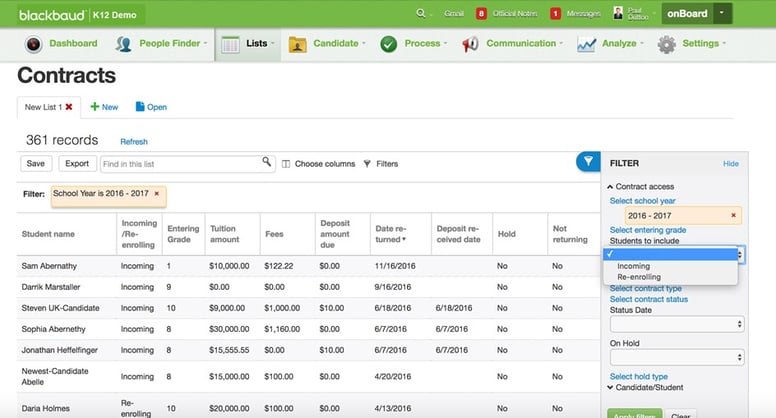
Blackbaud is generally a better fit for organizations with more complex operational needs, especially when fundraising and advancement play a central role.
It is best suited for:
- Organizations already using Blackbaud’s wider ecosystem of products,
- Schools with a strong focus on fundraising, donations, and alumni relations,
- Schools with the internal capacity to manage a longer implementation process,
- Institutions that are comfortable with tiered pricing and add-on-based models,
- Teams that require more customizable workflows across multiple departments.
If your priority is advanced fundraising capability and deeper configuration within a broader ecosystem, Blackbaud may be the better choice.
So in practical terms, the distinction is fairly clear.
Choose MySchool if you want a modern, all-in-one platform built for Canadian schools, with faster implementation, more predictable pricing, and less operational friction.
Choose Blackbaud if fundraising depth is a major priority and your school is prepared for a more complex, multi-product setup.
MySchool vs. Blackbaud at a Glance
If you want the short version before we get into the details, here is a side-by-side view of how MySchool and Blackbaud compare across the areas that matter most.
|
Category |
MySchool |
Blackbaud |
|
Target Audience Focus |
Canadian K-12 Independent Schools |
Fundraising Organizations, CSR Teams, K-12 Schools |
|
School Management Platform Modules |
SIS, Communication, Tuition Management, Admission & Forms, Advancement & Donations, LMS, Provincial Reporting, Integrations & APIs |
Enrollment, Tuition & Billing, SIS, LMS, School Websites, Partners & API |
|
Data Hosting |
Canada Hosting |
US Hosting in Compliance with Canadian Privacy Laws |
|
Pricing Structure |
Fixed per-student pricing for any school |
Tiered pricing based on school type and size |
|
CAD Pricing |
CAD-first pricing structure, no extra fees |
CAD pricing with transaction fees |
|
4.7 / 5 |
4.1 / 5 |
|
|
4.0 / 5 |
3.8 / 5 |
|
|
4.7 / 5 |
4.1 / 5 |
|
|
Customer Success & Support |
Dedicated CSM for all users, Customer Support |
Tiered CS and Support for each product |
|
Ontario Ministry Reporting |
Built-in OnSIS reporting |
General custom reporting |
|
British Columbia Ministry Reporting |
Built-in TRAX, 1701, and PSR reporting |
General custom reporting |
That gives you the high-level picture. Now let’s look more closely at how those differences show up in practice, starting with implementation.
Implementation: How Much Time and Effort Should You Expect?
Implementation is one of those things that can look straightforward at the start and feel very different once the work begins. The timeline depends on your school’s size, the number of modules you adopt, and how much historical data needs to be migrated.
In practice, most platforms tend to follow one of two models:
- All-in-one systems often offer faster, more guided onboarding with fewer moving parts,
- Multi-product ecosystems usually involve more coordination, more configuration, and more internal involvement from your team.
When comparing MySchool and Blackbaud, a few practical questions are worth asking:
- How many tools need to be replaced?
- How complex are your current workflows?
- Can your team realistically support a longer onboarding process?
- How much hands-on guidance will the vendor provide along the way?
If your priority is to get up and running quickly without putting too much additional strain on your team, a more unified platform like MySchool may be the better fit.
If your school needs deeper configuration across multiple departments and has the capacity to support a more involved rollout, a more configurable ecosystem like Blackbaud may be worth the extra setup effort.
And because implementation is only one part of the decision, the next question is just as important: what will the platform actually cost once everything is in place?
Pricing: What Actually Impacts Your Total Cost?
Once implementation is on the table, pricing usually becomes the next big question. And with school management platforms, the real cost is rarely just the number you see first.
The total cost depends not only on the subscription itself, but on how the platform is structured and how your school ends up using it over time.
In practice, there are two common pricing models:
- Per-student, all-in-one pricing, which tends to make costs easier to predict as your school grows,
- Tiered or modular pricing, which can offer more flexibility but often comes with additional fees for specific features or services.
When comparing MySchool and Blackbaud, it is worth looking beyond the headline price and asking a few more practical questions:
- Are core features included, or sold separately as add-ons?
- Are there payment processing or transaction fees?
- Will integrations or additional modules increase the overall cost?
- Are implementation and onboarding included, or priced separately?
If your priority is cost predictability, fewer hidden fees, and a pricing structure that is easier to plan around, a fixed per-student model like MySchool’s is often the simpler option.
If your school prefers to pay for specific capabilities and build a more tailored setup over time, a modular pricing model like Blackbaud’s may offer more flexibility, though usually with more complexity attached.
And of course, cost is only one side of the equation. The next question is how easy the platform will actually be for your team to use once it is in place.
Usability: How Easy Is It for Your Team to Adopt?
Price matters. But even the best-priced system can become expensive in other ways if your team finds it hard to use.
That is why usability matters so much. A platform does not help much if staff avoid it, work around it, or need constant support just to complete everyday tasks.
In many cases, usability comes down to how the platform is structured:
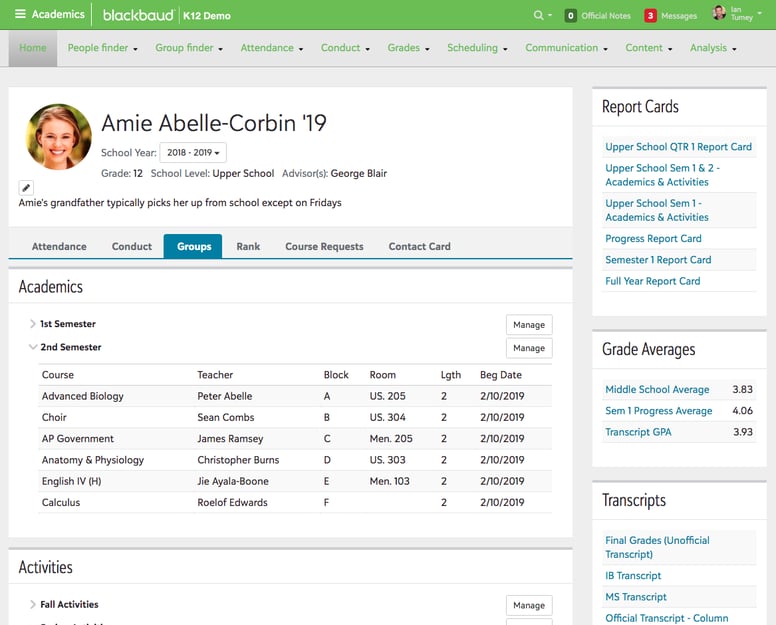
- Unified platforms usually offer a more consistent experience across modules, which can make the learning curve easier to manage,
- Separate feature-based products may provide deeper functionality in certain areas, but can also require users to move between different tools or interfaces.
When evaluating usability, it helps to look at the day-to-day reality of using the system:
- How many steps does it take to complete common tasks?
- Will teachers, administrators, and finance teams all work in the same environment?
- How much training will staff need before they feel confident?
- Is the interface intuitive for non-technical users?
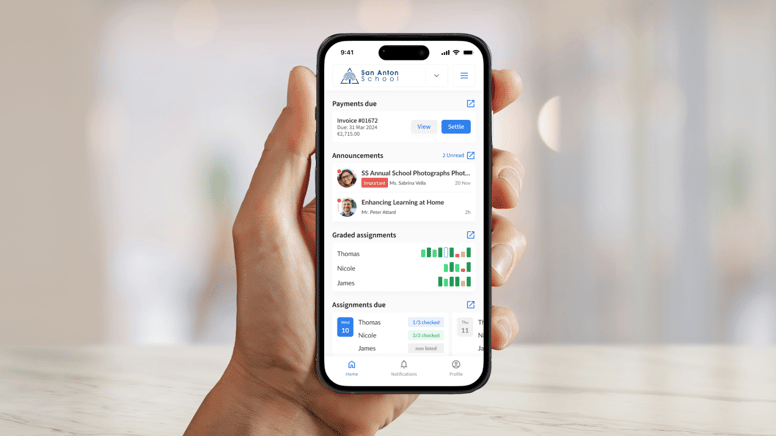
If ease of adoption is a major priority, a more streamlined, all-in-one ecosystem like MySchool can reduce friction across teams and make everyday work feel more straightforward.
If your organization has more specialized roles and can support more complex workflows, Blackbaud’s wider product range may offer additional depth.
And once usability is covered, the next question is what kind of support your school can expect after implementation and in use.
Support: What Kind of Help Will Your School Actually Get?
Support can look like a secondary detail during the buying process. In practice, it rarely feels secondary once your system is live.
When your school needs help, what matters is not just whether support exists, but how quickly it responds, how well it understands your context, and whether it feels like a real partnership rather than a ticket disappearing into a queue.
That is why support is worth evaluating as carefully as features, pricing, or implementation. A platform may look strong on paper, but the experience can feel very different if help is slow, generic, or disconnected from the reality of how your school actually operates.
When comparing support, it is worth asking:
- How quickly can your team expect a response?
- Is support available when issues come up outside regular hours?
- Will your school have a dedicated partner who knows your context?
- Does the support feel practical and human, or mostly transactional?
MySchool puts a strong emphasis on responsive, human support. Schools get 24/7 support, a very low median response time, and a dedicated Customer Success Partner who offers more than just reactive help. For schools that value fast answers, real continuity, and support grounded in the reality of Canadian education, that can make a meaningful difference.
Blackbaud may still suit schools that are comfortable working within a broader ecosystem and support structure. But for schools looking for a more personal, hands-on experience, MySchool’s approach is likely to feel more direct, more consistent, and easier to rely on over time.
And once support is part of the picture, it becomes easier to step back and look at the comparison as a whole.
MySchool vs. Blackbaud: Final Verdict by Category
By this point, the broader pattern is likely already clear. But if you want the short version, here is where each platform stands across the categories that tend to matter most in practice.
|
Category |
Winner |
Why? |
|
Ease of implementation |
MySchool |
Faster onboarding with a more unified system |
|
Pricing predictability |
MySchool |
Fixed per-student pricing in CAD with no transaction fees |
|
Fundraising & advancement |
Blackbaud |
More advanced and specialized fundraising tools |
|
Usability |
MySchool |
A more consistent experience across modules |
|
Support experience |
MySchool |
24/7 support, low median response time, and a dedicated Customer Success Partner |
|
Customization depth |
Blackbaud |
Greater flexibility for more complex workflows |
|
Fit for Canadian schools |
MySchool |
Canadian hosting, built-in provincial reporting, and local context |
|
All-in-one functionality |
MySchool |
Fewer tools to manage, connect, and maintain |
What this means for your school
- Choose MySchool if you want a simpler, faster, more connected school management platform built around the needs of Canadian schools.
- Choose Blackbaud if advanced fundraising is a major priority and your school is comfortable with a more complex, multi-product setup.
And if you want to see what that difference can look like in practice, the next example makes it much more concrete.
Switching from Blackbaud to MySchool: How Okanagan Christian School Simplified Operations
Okanagan Christian School (OCS), a K-12 independent school in British Columbia, faced a challenge that many schools encounter when using Blackbaud: complexity without cohesion.
Blackbaud offered a wide range of functionality, but in day-to-day practice, the experience felt disconnected. Staff had to move between multiple systems, information lived in different places, and even simple tasks often took more steps than they should have.
Over time, that friction spread across the school.
The impact was clear:
- Teachers struggled with a complex interface,
- Parents missed important communications,
- The finance team faced rising costs tied to add-ons,
- Staff experienced delays when waiting for support.
At a certain point, the system was no longer just difficult to manage. It had started getting in the way of the work itself.
OCS decided to move to MySchool in order to simplify operations through one unified platform. The results were meaningful: stronger parent engagement, noticeable time savings for staff, and lower overall software costs.
More importantly, the school was able to spend less time managing systems and more time focusing on students.
If you are currently using Blackbaud and running into similar challenges, this case offers a concrete example of what a transition can look like in practice.
Thinking of Switching from Blackbaud?
By this point, the bigger question may no longer be whether the differences between these platforms matter, but whether staying with your current setup is still the right long-term choice for your school.
Most schools hesitate to switch systems because they assume the process will be disruptive. That hesitation is understandable. Changing a core platform is not a small decision, and no school wants to create extra disruption for staff in the middle of an already demanding year.
At the same time, it is worth weighing that short-term concern against the long-term cost of staying with a system that may slow down daily operations or depend on multiple add-ons to function effectively.
If you are already exploring alternatives, the decision often comes down to a simple question: Does your current setup still support the way your school needs to work, or would a more unified approach reduce complexity over time?
What to Expect If You Decide to Switch
Moving away from Blackbaud does not mean starting from scratch. Most modern platforms are built to support transitions in a structured, manageable way.
That usually includes:
- Secure migration of student, academic, and financial data,
- Configuration based on your school’s workflows,
- Staff onboarding and training,
- Ongoing support during rollout.
Many schools choose to align implementation with natural academic transitions, while others take a phased approach to reduce disruption and give teams more time to adjust.
As with any major platform change, the overall experience will depend on how guided, structured, and well-supported the onboarding process is.
And that is exactly where the way a platform is built starts to matter again.
Considering a Switch to MySchool
If you are evaluating a move away from Blackbaud, one of the most important differences to consider is how the platform is structured.
MySchool is designed as a unified system, where core functions such as SIS, communication, admissions, tuition, and reporting work together in one place. That can reduce the need for multiple tools, simplify workflows, and make it easier for teams to adopt the system consistently.
For schools that want to streamline operations rather than manage multiple products, that kind of structure can make a noticeable difference over time.
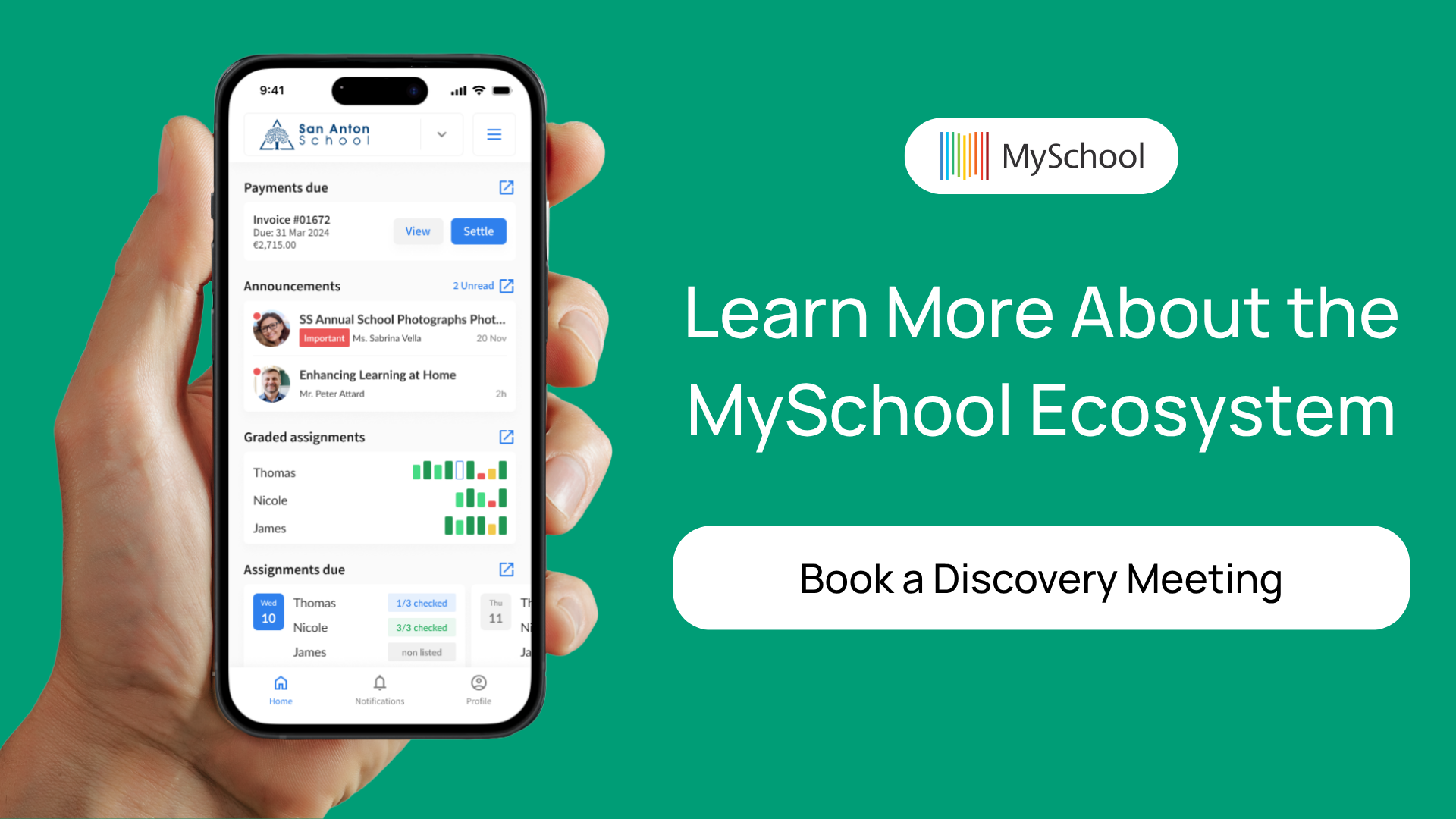
If that sounds like the direction your school is moving in, book a short meeting with MySchool to learn more about what the switch can look like in practice.
FAQ
What’s the main difference between MySchool and Blackbaud?
The primary difference is how the platforms are structured. MySchool is built as a unified, all-in-one system, while Blackbaud typically operates as a suite of interconnected products. This affects usability, implementation time, and overall complexity.
Which platform is easier to use for staff and teachers?
Usability depends on your team’s needs, but unified systems like MySchool generally offer a more consistent interface across modules. Blackbaud can provide deeper functionality, but may require navigating multiple tools or workflows.
How do MySchool and Blackbaud compare on pricing?
MySchool uses a fixed per-student pricing model in CAD, which makes costs more predictable. Blackbaud typically uses a tiered or modular pricing structure, where costs can vary depending on selected features, add-ons, and transaction fees.
Which platform is better for Canadian schools?
MySchool is specifically designed for Canadian schools, with local data hosting and built-in provincial reporting (e.g., OnSIS, TRAX, 1701, PSR). Blackbaud supports Canadian schools but is built for a broader, global audience.
Do both platforms support integrations?
Yes, both MySchool and Blackbaud offer integrations and APIs. However, schools using multiple Blackbaud products may rely more on integrations between tools, while MySchool’s all-in-one structure reduces the need for external connections.
Which platform is better for fundraising and advancement?
Blackbaud has more advanced and specialized tools for fundraising, donor management, and alumni relations. MySchool includes advancement and donation features, but is more focused on providing a unified school management experience.
Can both platforms scale as a school grows?
Yes, both platforms are designed to scale. The difference lies in how that scaling happens: MySchool scales within a single system, while Blackbaud often scales by adding additional products or modules.
Related Posts
Fix the Process or Replace the School Management System? How to Tell Which Problem You Have
Before you retrain the team or start shopping for new software, find out where the extra work actually begins. Learn how to test whether better ownership, training, and process design will solve the issue — or whether the limitation sits in the system itself.
School Administration Software: Tools for Independent Schools
Canadian independent school administrators juggle dozens of tasks every day. This guide highlights 11 tools that can make that work simpler, faster, and easier to manage.

The First 30 Days Back: Where School Operations Start to Crack
The first 30 days back show you how your school’s operations really hold up under pressure. This post helps you separate normal start-of-year friction from operational issues that followed you from last year.